Hexense Canvas: no menus, the work opens on the canvas
You talk, the work opens on the canvas; everything you open stays on a branch with its context, and the AI works with you on the same canvas.
The oldest habit of enterprise software is the menu. To see a record you first find the right module, then the right page, then the right tab. The record’s tasks sit in one tab, its documents in another, its approval flow in a sub-form. When AI enters the picture, this usually doesn’t get better; it splits in two: chat in one window, work on another screen. The assistant suggests something, you copy it and apply it on a different page.
Over the past weeks we shipped a way of working in Hexense that removes that split, and we gave it a name: Hexense Canvas.
Hexense Canvas has no menus: you talk, the work opens on the canvas; everything you open stays on a branch with its context, and the AI works with you on the same canvas.
When we explain the concept we call it a branching canvas: a canvas that remembers the path the work was opened from. Below are its four principles, with screenshots of how it runs in the cloud today.
1. One session: chat and work in the same place
The single door to working in Hexense is a session. Chat and work live in the same session; you don’t click through an app menu to see a record.
When you open an empty session, the Palette (Ctrl K) greets you. Your favorites and recent items sit on top, apps and core widgets below: work, people, board, documents, memory. You tap an app, drill into its module and pick what you want to open. Search works across all of them.
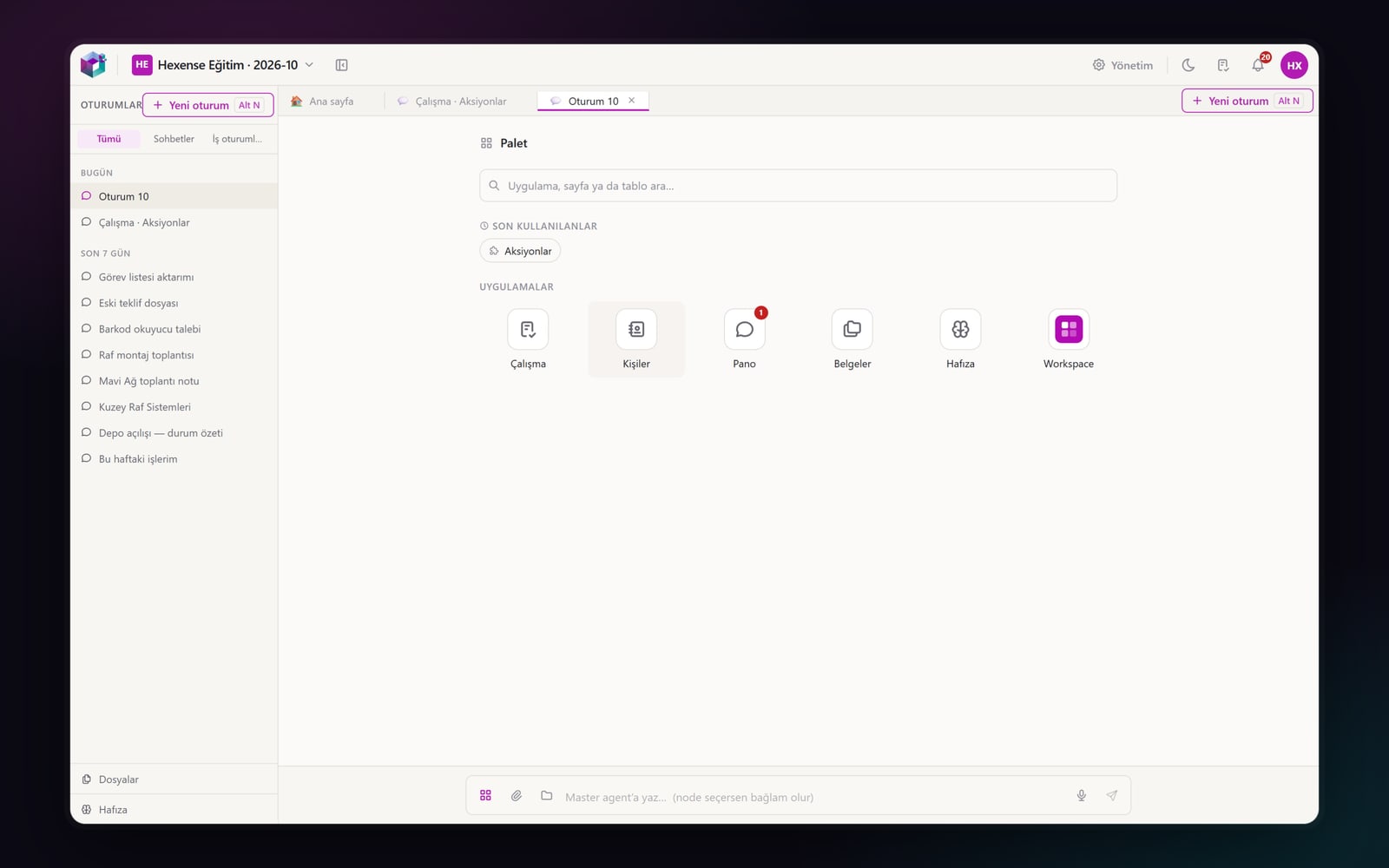
You don’t have to touch the Palette at all: write what you need, and the agent opens the record or list on the same canvas. The short explanation of the answer stays in a bubble right above the input box; the screen is not split between a chat panel and a work area.
2. Single-purpose widget: no forms inside forms
The weight of enterprise screens comes from trying to fit everything about a record onto one page: the card, a task table under it, the flow beside it, documents below that. On Hexense Canvas every widget does one job.
A record card shows its identity, five to seven key fields and its status. Everything else attached to the record (tasks, workflow, RACI, stakeholders, documents, related records) is a line, with its count, in the Related menu in the card’s header. Tap a line and that information opens in its own widget, right under the card on the canvas.
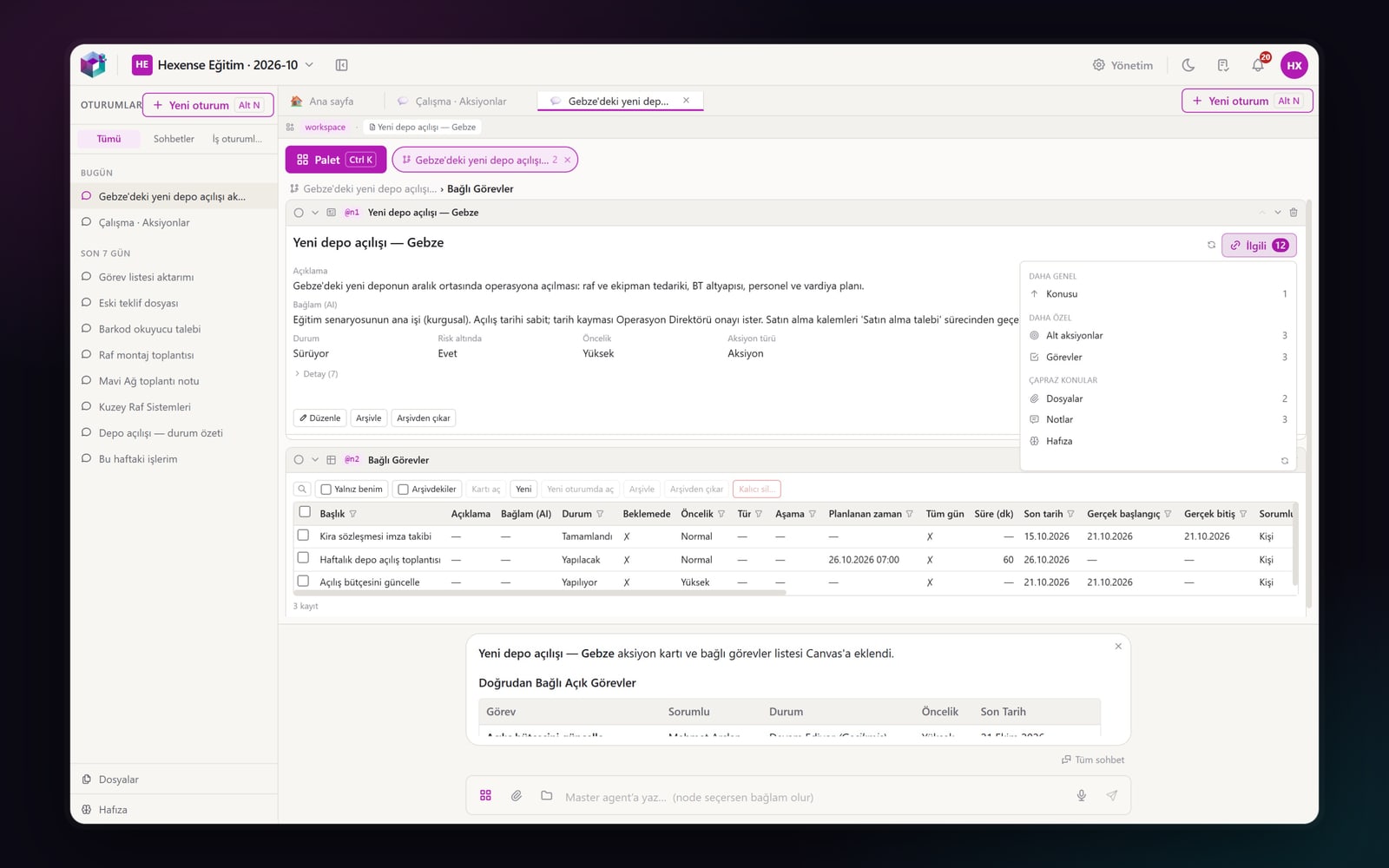
The Related menu reads a record in four directions: broader (the project or organization it belongs to), narrower (sub-items, tasks), cross topics (other work tied to the same person or place) and another view (one section of the same record). If nothing is attached, there is no line; we don’t show empty sections.
3. Branch: you never lose where you opened something from
The risk of a screen without menus is clutter: after opening ten widgets you lose track of which one was opened and why. Hexense Canvas solves this with branches.
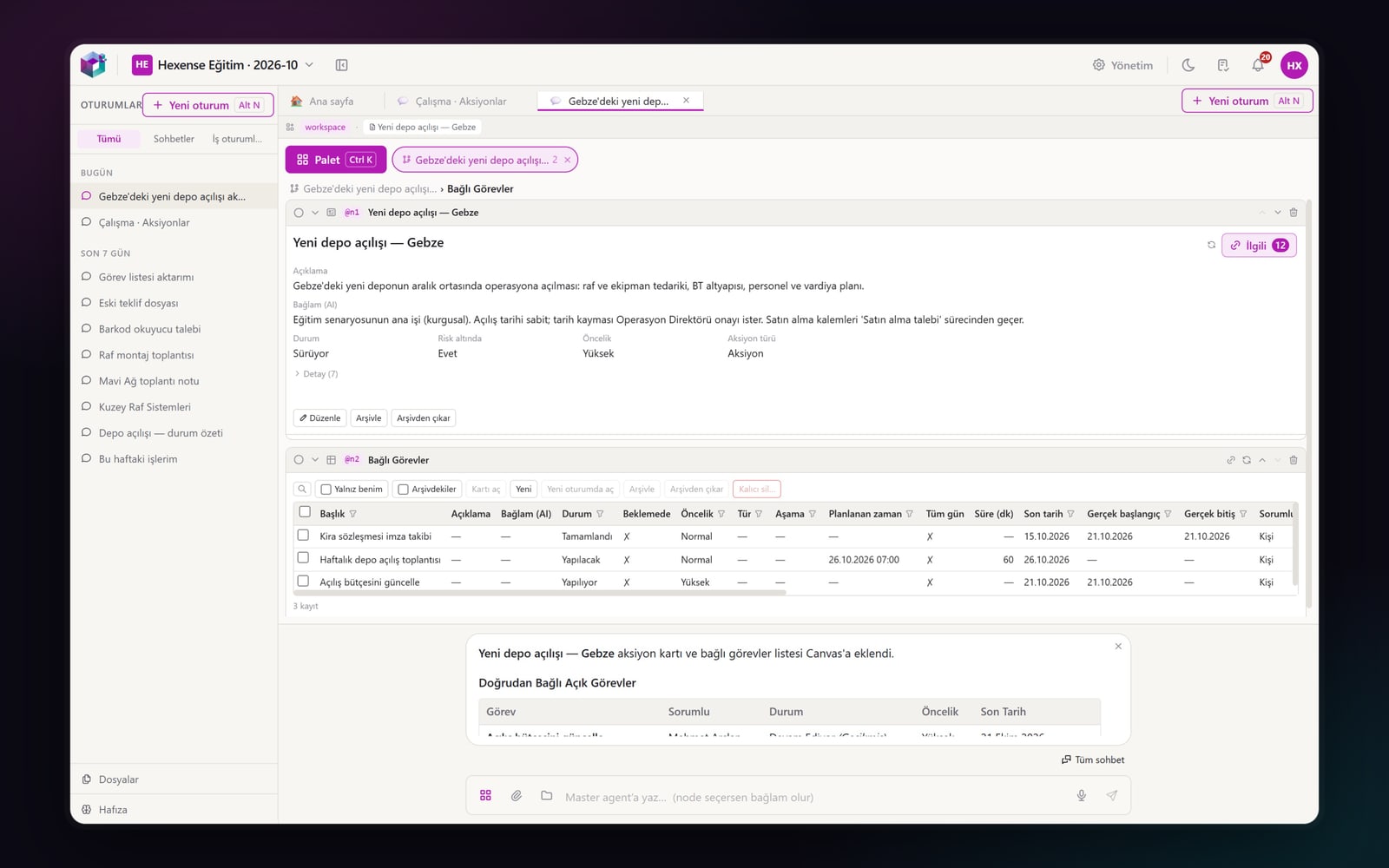
Whatever you open from inside something becomes a branch. If you went from the action list to an action and then to its sub-items, you see that path at the top of the canvas: Actions › New warehouse opening — Gebze. Anything you open from the Palette starts a new branch. Branches sit next to the Palette button as chips, each with its name and widget count. Tap a chip and you’re back in that work, where you left it.
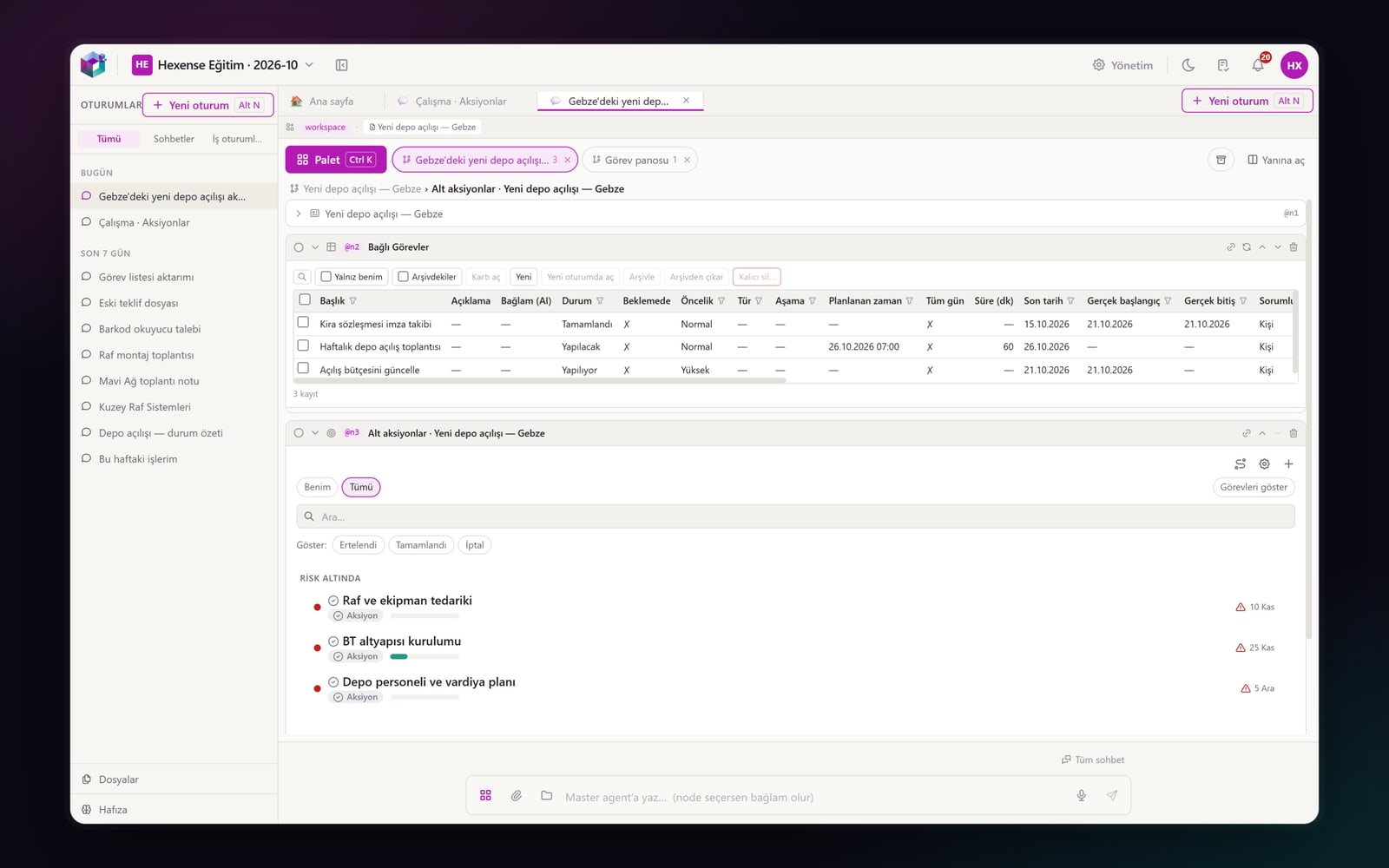
On every branch the last two widgets stay open and older ones fold into a single line; click to open them again. The canvas grows, but it doesn’t become unreadable.
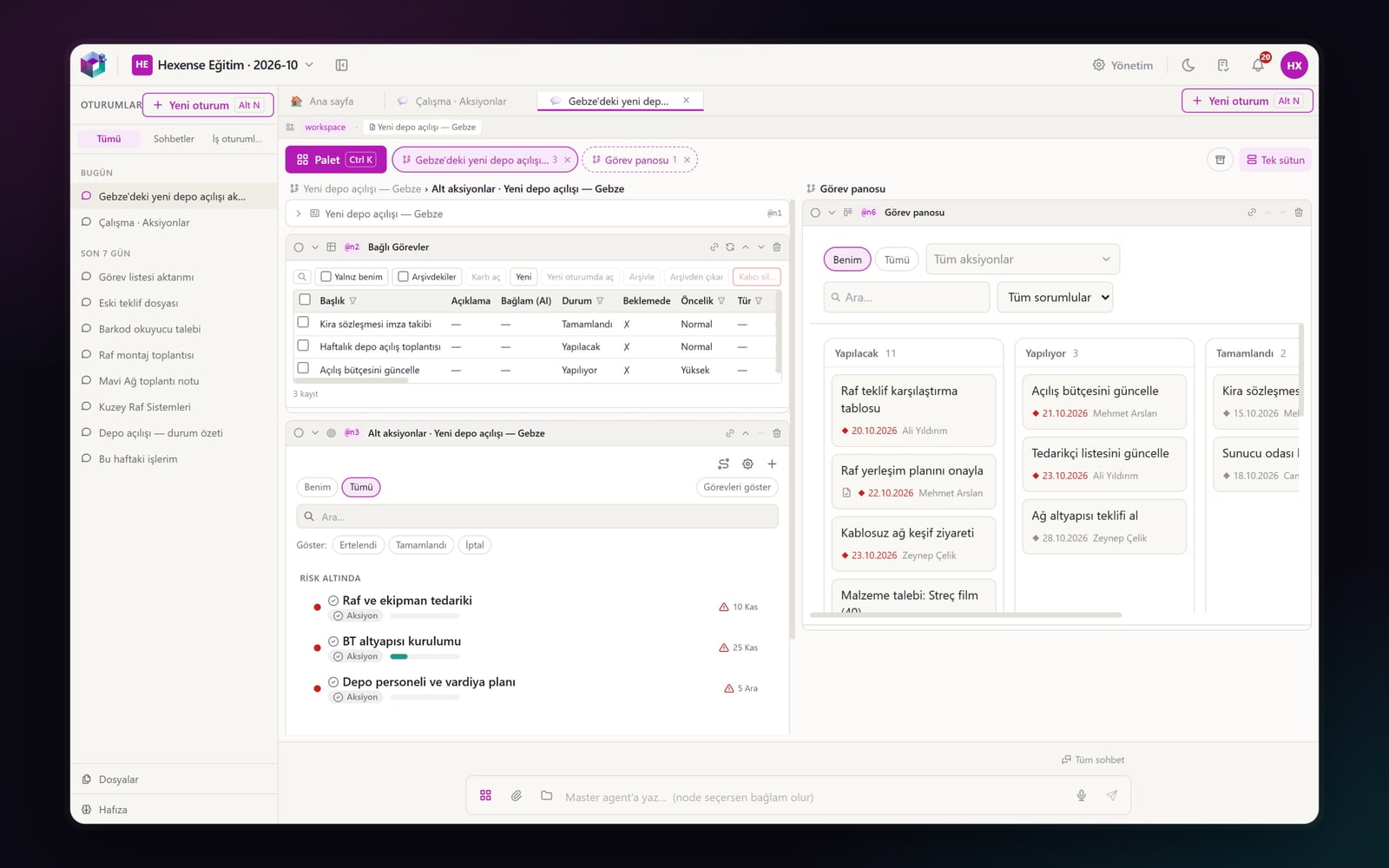
When you need to compare two pieces of work, you open two branches side by side: one in the left column, the other on the right. You read an action’s sub-items next to the team’s task board, or an offer next to the customer record.
4. Agent on canvas: the AI works on the same canvas
On Hexense Canvas the AI doesn’t sit in a separate window. When you ask the agent for a record, a list or a summary, the widget it opens lands on the branch of the record being discussed. If you’re talking about an action, the task list the agent opens appears on that action’s branch, under its card. If the topic is new work, the agent opens a new branch and says so in a single line under its answer.
There is a clear line between what the agent reads and what it writes: every operation that writes to a record comes with an approval card. You see what will be done, then approve or cancel. The agent can’t exceed your permissions; every operation is recorded. Autonomy is not lack of control.
A short example
The screenshots above come from a single flow: a team running a new warehouse opening (fictional demo data).
- You open an empty session and write to the agent: "Open the new warehouse opening action in Gebze and show its open tasks with their owners." The agent opens the action card and its linked tasks on the canvas; a new branch starts and the summary stays in the bubble.
- In the card’s Related menu you tap "Sub-actions 3". The sub-items open under the card. The branch now has three widgets; the oldest, the card, folds into a single line.
- If you ask the agent to change a task’s date, it doesn’t do it directly; it shows what it will do in an approval card, and the approval comes from you.
- Meanwhile you need to look at all of the team’s work. From the Palette you open Work › Task board; a new branch starts. The warehouse opening branch waits on the strip as a chip.
- With "Open beside" you open both branches in two columns: the action’s sub-items on the left, the task board on the right.
None of these steps needs a menu, a separate page or copy-and-paste. The work moves on without losing the path it came from.
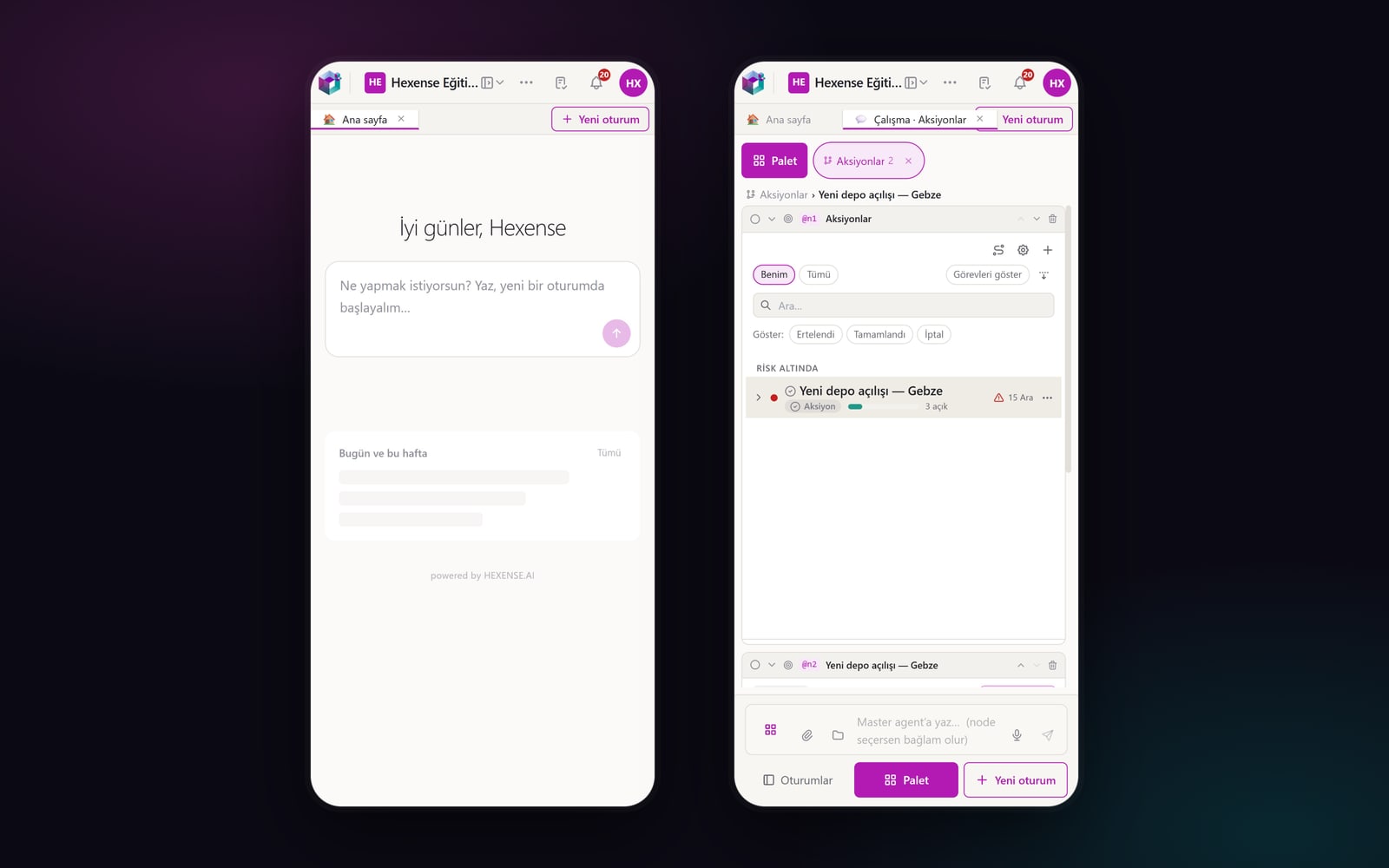
The same model works on a phone: two columns collapse into one, the branch strip scrolls sideways, and sessions, the Palette and a new session sit in the bar under the input box.
Why it matters
AI doesn’t just speed work up; it grows the context. As the context grows, the human follow-up load hits a limit: which record belongs to which piece of work, where it came from and where it goes, what the agent did and why. A classic menu structure doesn’t reduce that load; it expects users to keep the relationships between pages in their heads.
Hexense Canvas moves those relationships onto the screen itself. Branches keep the trail of the work; the Related menu puts the context around a record in front of you, with counts; the agent works on the same trail and places what it opens next to what you opened. You don’t go to the screen, the screen comes to you.
To be honest, none of the parts is new on its own. Chat-based AI assistants, infinite canvases and tab groups in browsers are common today. What makes Hexense Canvas different is bringing them together inside enterprise work: records, their relationships, permissions and approval rules on the same canvas; people and agents on the same trail.
Hexense Canvas is live in the cloud today. If you’d like to try it, you can create a free workspace or book a call with us.